
Next-Generation Business Intelligence
Built Inside Your Data.
The New Age of BI.
MPP BI is built for the next generation of business intelligence and analytics. The business logic runs directly inside the database, not on top of it. We don't need the calculation engine or BI servers. 2×–12× faster than traditional BI, increasing with query complexity.
Why MPP BI
Built Inside Your Data.
The New Age of BI.
Every major BI tool on the market was built for a world where data was smaller. MPP BI's architecture is built for the future of big data in real time.
Faster
2×–12×
faster than traditional BI
Performance improvements validated in production across banking, insurance, oil & gas, and construction. The speed gap widens as query complexity grows.
Scalable
2B+
records, no RAM ceiling
No dataset size limits. Billions of records processed natively at the data source. 500 concurrent users on 16 cores and 32GB of RAM.
Secure
Zero
data extraction required
Data never leaves your environment. Access rights enforced at the metadata layer before any query executes, not after data has already moved. SSO, RBAC, full audit logging.
Affordable
$10
per viewer / month
No separate BI server. No calculation engine infrastructure. No expensive RAM tiers that scale with your data volume. A fraction of what legacy BI costs.
Always Live
No
import mode. Ever.
Live connection is not a mode in MPP BI. It is the only mode. There is no import mode, no scheduled refresh, no stale cache. Your queries go directly to the data source.
Trusted Globally
 Washington & Madison
 Global Business Gateway



 Washington & MadisonGlobal Business GatewayWashington & MadisonGlobal Business Gateway
The Problem
Traditional BI Has a Dirty Secret.
Every major BI platform was built around a calculation engine invented when databases were too slow for real-time analytics. Databases are no longer too slow. The engine is now just overhead.
Your Data Leaves Home
Tableau and Power BI extract your data into their own storage engines: Hyper and VertiPaq respectively. Every full-scale query requires a data copy. Latency. Security surface area. Infrastructure cost paid twice: once for the database, once for the BI layer that duplicates it.
Import Mode = Data Copy = Stale Data
You're Paying for an Engine You Don't Need
Power BI Premium. Tableau Server. License it, manage it, scale it, secure it, and it's still slower than running analytics where the data already lives. Switch to DirectQuery or Live Connection mode and roughly 40% of your calculation functions break. Not a bug. An architectural consequence.
DirectQuery Wall ≈ 40% of Functions Disabled
Three Tiers. Three Points of Failure.
Client → Application Server → Database. Every hop introduces latency, synchronization lag, and security exposure. This architecture hasn't fundamentally changed since the 1990s. The calculation engine was a workaround for slow databases. Databases are no longer slow. The engine is just overhead.
Client → App Server → Calc Engine → Source
MPP BI was designed from day one to eliminate both the calculation engine and internal data storage by running business logic directly inside your database.
Architecture
The Central Flaw in Every Legacy BI Tool
It's not a feature gap. It's a structural one. And it's been there since the 1990s.
4 Layers. 3 Bottlenecks. 1 Fundamental Flaw.
Browser Client
Renders dashboards. Sends queries.
App Server
Session management, query prep, user routing
Metadata Storage
Dashboard configs, users, audit logs, stored reports
Calculation Engine
In-memory compute. Expensive RAM. Hard size limits. Breaks DirectQuery. The reason DAX functions fail in live connection mode. The reason you copy your data.
bottleneckData Source
Externally connected. Data extracted and moved.
The calculation engine is why your data moves. It's why DirectQuery breaks. It's why you need expensive RAM. It's the bottleneck at the center of every legacy BI problem.
2 Layers. 0 Bottlenecks. No Calculation Engine.
Browser Client
Identical thin client. No plugins. Mobile ready.
MPP BI Core
App Server + Metadata Storage + Microservices. One unified block. Written in PL/pgSQL, running inside PostgreSQL. Prepares and pushes queries. Does not compute.
unifiedNo Calculation Engine
Eliminated. By design.
Your Data Source
Query pushed down. Runs natively. Full OctoLang support. Billions of records. No limits.
MPP BI's computation language was built as DirectQuery-native from day one. Every function. Every aggregation. Every complex calculation. All of it runs live, at the data source, without exception.
Legacy BI
Dataset size limited by RAM in the calculation engine
MPP BI
No size limit. Billions of records. Runs natively at the source.
Legacy BI
~40% of DAX functions broken or unsupported in DirectQuery
MPP BI
100% of OctoLang functions work in live connection. Always. No exceptions.
Legacy BI
4 infrastructure layers to buy, license, manage, and secure
MPP BI
2 infrastructure layers. Period.
Structural Decisions
What We Removed. And Why That Matters.
Most BI vendors add features. We removed the component that makes those features necessary.
The Calculation Engine
The in-memory calculation engine is the most expensive, most limiting component in legacy BI. It requires dedicated RAM. It imposes hard dataset size limits. It's the reason DirectQuery breaks. The engine can't push complex computations to the data source, so vendors disable those functions rather than fix the architecture.
MPP BI eliminated it. Computation happens at the data source, pushed there by OctoLang. No engine. No RAM cost. No ceiling. No broken functions. The absence of this component is not a missing feature. It's the product's most significant engineering decision.
The Separate App Server
Legacy BI separates the app server (query prep, user management, session handling) from metadata storage (dashboard configs, access rights, audit logs). Two systems to deploy, synchronize, and maintain. Two surfaces to secure.
MPP BI Core unifies both into one block, running inside PostgreSQL. One system. Half the infrastructure footprint. Metadata-enforced access rights are applied before query execution, not after data has already moved.
The Data Copy
Legacy BI's import mode exists because the calculation engine needs data fed to it. The engine cannot reach into your data source and compute there, so the data must come to it. Without import mode, DirectQuery's limitations make the tool unusable for complex analytics. This is a workaround for a structural flaw.
MPP BI has no import mode because it has no calculation engine. Your data lives where it lives. The query goes to the data. Always fresh. Always live. Always complete.
Language & Architecture
The Language Makes the Architecture Work
A BI tool's analytical language is either built for live data or it isn't. There's no middle ground that survives production.
Powerful language.
Crippled in live mode.
Power BI's DAX is a sophisticated analytical language in import mode. Switch to DirectQuery and a significant portion of DAX functions are unsupported, return errors, or produce different results. This is documented by Microsoft.
Your analysts know this wall. They've hit it. They go back to import mode and accept stale data, refreshed on a schedule, disconnected from reality.
// DAX: CALCULATE in DirectQuery mode
CALCULATE(
  SUM(Sales[Revenue]),
  FILTER(
    ALL(Sales),
    Sales[Date] >= DATEADD(TODAY(), -90, DAY)
  )
)

// ⚠ Not supported in DirectQuery
// Switch to Import Mode to use this function.
// Your data will no longer be live.
"Some DAX functions and query patterns are not supported in DirectQuery models."
Source: Microsoft Power BI documentation
Built for live.
No exceptions.
OctoLang is MPP BI's analytical language. It was designed as DirectQuery-native from the first line of code. There is no import mode to fall back on. There is no degraded functionality in live connection.
Every OctoLang function, every aggregation, every complex business calculation runs live, pushed down to your data source, against any volume of data. Not because we tried to make it work in live mode. Because we never designed it any other way.
-- OctoLang: same calculation, live connection
SELECT
  SUM(revenue)
FROM sales
WHERE
  sale_date >= CURRENT_DATE - INTERVAL '90 days'
  AND {user_access_filter}

-- ✅ Runs live. Against your data source.
-- Always. No exceptions. No mode switching.
Every OctoLang aggregation, window function, and complex calculation is pushdown-compatible by construction. The language has no import-mode variant, no fallback, and no degraded mode.
DAX was built for import mode and adapted for live connection.
OctoLang was built for live connection from day one. Full stop.
By the Numbers
The Numbers Don't Lie.
How MPP BI compares to the tools your team is already evaluating.
← Swipe to see all columns →
| Feature | MPP BI | Tableau | Power BI |
|---|---|---|---|
| Read-only user / month | $10 | ~$35 | ~$14* |
| Creator / admin / month | $18 | ~$115 | ~$24 |
| Perpetual license | |||
| Business logic runs in database | |||
| Calculation engine | None | Hyper | VertiPaq |
| Internal data storage | None | Required | Required |
| Data extraction required | Never | Always | Always |
| 100% functions in live mode | Approx. 60% | Approx. 60% | |
| On-premises (full) | Limited | Limited | |
| AI/ML integrated on-prem | Native | Add-on | Add-on |
| Source code available | Per license | ||
| Hot/Warm/Cold data layers | |||
| 500 concurrent users · 16 cores / 32GB RAM | Production proven | Requires Premium | Requires Premium |
| 2B+ records in under 5 seconds | Production proven | Not validated | Not validated |
| Performance vs traditional BI | 2x–12x faster | Baseline | Baseline |
| Integrated ETL | Included | Limited |
Pricing as of Q1 2026. *Power BI Pro requires Microsoft 365 subscription. Full enterprise capability requires Power BI Premium at significantly higher cost.
Use Cases
Built for the Industries That Can't Afford Slow
Real deployments. Real results. Industries where data sovereignty, performance, and cost all matter.
Real-Time Risk at Scale
When milliseconds determine margin, you can't afford a three-tier BI pipeline.
Pain Points
- ✗Real-time risk dashboards require sub-second query response
- ✗Regulatory data cannot leave on-premises infrastructure
- ✗Complex financial models choke traditional BI servers
- ✗Audit trails demand data lineage without extraction gaps
Why MPP BI
- ✓Business logic runs inside your compliant database, data never leaves
- ✓Hot/Warm/Cold tiers handle real-time feeds through historical archives
- ✓Perpetual license available for regulatory and air-gapped environments
- ✓AI/ML risk scoring natively integrated via stored procedures
Key Result
Faster risk calculations vs. traditional BI platforms, with zero data extraction from compliant databases.
Pricing for this sector
Platform Features
Everything You'd Expect. Plus What You Wouldn't.
A full-stack analytics platform that lives inside your database, with the features to prove it.
30+ Visualization Types
Dashboards, geographic maps, SVG industrial schematics, heatmaps, Gantt, KPI cards, drill-down. Custom visualizations via TypeScript/JavaScript API.
AI/ML Native
LLM chatbot interface, predictive forecasting, NLP on unstructured data, R and Python model integration. No separate AI infrastructure required.
MPP ETL Included
Visual no-code ETL/ELT pipeline builder included in every license. Kafka, Redis, SAP RFC, ClickHouse, Oracle, PostgreSQL. 7,000+ events/sec streaming.
Enterprise Security
AD + Kerberos, OAuth 2.0, OpenID Connect, JWT, SHA-512 hashing, row-level access enforced at metadata layer before query execution. Full audit logging.
100% Customizable
Full brand kit, JavaScript API for custom visualizations, industrial schematics to exact operator specification. White-label ready. Source code per license.
Embedded Analytics
Embed dashboards into any external system or public website. Authenticated embedding with role inheritance. No MPP BI branding required.
See It in Action
See What Analytics Looks Like Without Compromise.
Real dashboards. Real deployments. Data never leaves the source.
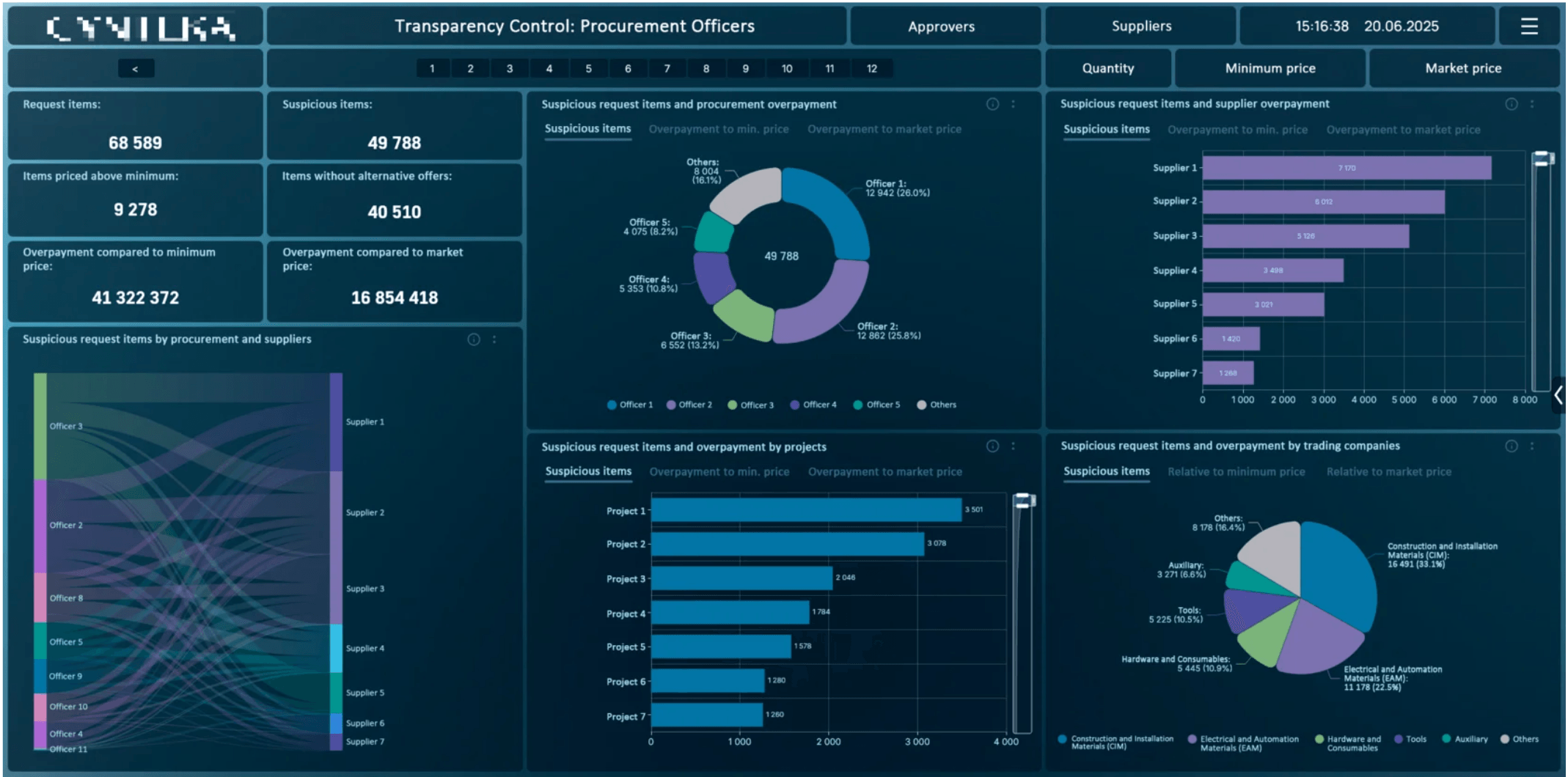
Real-time procurement transparency: suspicious items, overpayment detection, and supplier analysis across 500+ entities. Business logic runs inside the database, data never extracted.
Production benchmarks across financial services, oil & gas, insurance, and construction deployments.
Pricing
Transparent Pricing. No Surprises.
Two paths to the same world-class analytics platform. Choose what fits your procurement model.
SaaS Subscription
Pay monthly or annually. Scale seats as your team grows.
- Read-Only User: $10/seat/month
- Creator/Admin: $18/seat/month
- Integrated MPP ETL included
- All visualization types
- Cloud or on-premises deployment
- Standard support: +20% of license
Perpetual License
One-time fee. Own your deployment. Ideal for regulated and air-gapped environments.
- Read-Only User: $240/seat (billed annually)
- Creator/Admin: $432/seat (billed annually)
- Integrated MPP ETL included
- Full on-premises deployment
- Source code available per license
- Standard support: +20% of license
Tableau Creator starts at ~$75/seat/month. Power BI Pro requires Microsoft 365 and caps capability without Power BI Premium. MPP BI includes integrated ETL, on-premises deployment, and source code availability, with no separate BI server required.

Stop Moving Your Data
to Your BI Tool.
Bring your BI tool to your data.
MPP BI is developed by MPP Insights LLC, headquartered in Richmond, Virginia with an R&D center in Yerevan, Armenia. Global delivery. UN Supplier.
mpp-insights.com