
Why MPP BI
A Modern BI Platform for Smarter Data Decisions
Most BI tools make you choose between flexibility, fair pricing, scale, and control. MPP BI gives you all four.
Performance
2B+ records
processed in under 5 seconds
Scalable
500 users
proven at 16 cores / 32GB RAM
Proven
Government-tested
chosen over Power BI by a UN-backed government project
Customizable
White-labeled
looks and feels like your own product, not ours
The comparison
See How MPP BI Compares
Everything that sets MPP BI apart from Tableau and Power BI, in one table.
← Swipe to see all columns →
| Feature | MPP BI | Tableau | Power BI |
|---|---|---|---|
| Read-only user / month | $10 | ~$35 | ~$14* |
| Creator / admin / month | $18 | ~$115 | ~$24 |
| Business logic runs in database | Yes | No | No |
| Calculation engine | Not required | Required | Required |
| Internal data storage | Not required | Required | Required |
| Data extraction required | Never | Always | Always |
| Functions in live mode | 100% | Approx. 60% | Approx. 60% |
| On-premises (full) | Yes | Limited | Limited |
| AI/ML integrated on-prem | Built-in | Add-on | Add-on |
| Source code available | Per license | No | No |
| 500 concurrent users · 16 cores / 32GB RAM | Production proven | Not available | Not available |
| Performance vs traditional BI | 2x–12x faster | Baseline | Baseline |
* Pricing as of Q2 2026.
* Power BI Pro requires a Microsoft 365 subscription. Full enterprise capability requires Power BI Premium at significantly higher cost.
Deployment
On-Premise Without Operational Complexity
MPP BI can run fully on-premise or in your cloud environment. Both options use the same product and architecture. The difference is only where it runs.
On-premise vs. cloud deployment
On-Premise
Cloud Deployment
Runs fully inside your own infrastructure
Runs in your chosen cloud environment
Data stays within your systems
Data is processed in cloud infrastructure
Uses existing servers and databases
Uses cloud-provided compute resources
No external service dependency
Managed infrastructure layer
Works with your current security model
Cloud-based security configuration
How Other BI Tools Approach On-Premise Setups
Some BI platforms introduce additional structure even in on-premise environments, which can add setup and operational complexity. For example, Power BI:
On-premise setups require Windows-based servers
Power BI Report Server runs only in a Microsoft-controlled stack
Power BI Desktop is Windows-only
Full usage typically depends on additional Microsoft ecosystem services
This means even when deployed locally, the system is still connected to a specific vendor environment and its tooling.
Who is it for
On-premise
The right fit if your organization needs full control over where data lives, or works under strict security and compliance rules.
Cloud
A good fit if your team doesn't have strict data residency requirements and wants to skip managing infrastructure. Same product, same features. Nothing to install or maintain on your own servers.
Either way, you control who can see your data: row and chart-level access, multi-factor authentication, and a full audit log.
Case study
A Government Foundation That Left Power BI Behind



In partnership with the United Nations Development Programme (UNDP), for the WISE foundation, which runs digital social services systems for Armenia's Ministry of Labour and Social Affairs.
WISE needed a BI tool that could run fully on its own infrastructure and scale as it grew. Power BI couldn't offer that, so WISE switched to MPP BI. Now they run their reporting independently, pull data from multiple systems into one view, and can keep adding new sources and users without limits.
- Handles sensitive social services data entirely on its own infrastructure
- Reporting pulls from multiple systems into one consistent view
- Relies far less on the Microsoft ecosystem
- Ready to take on new data sources and more users as it grows
Want the full story? Read the complete walkthrough, including the architecture and a look at the dashboard.
Read the full case study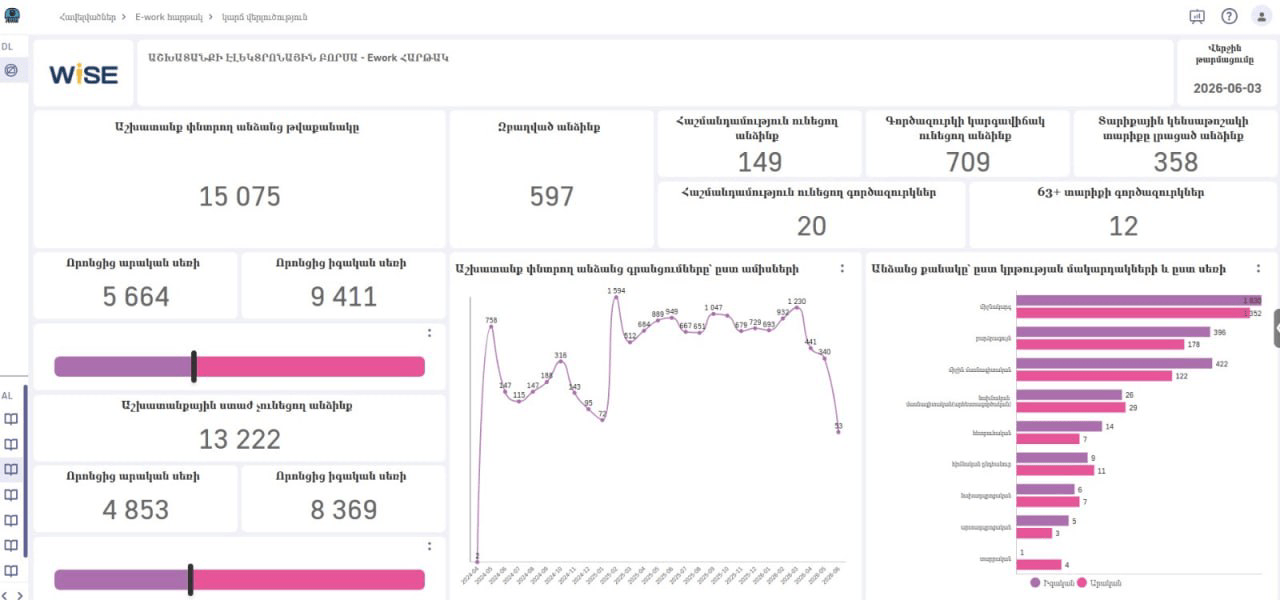
Enterprise scale
Built for Many Users at Once
MPP BI is built for environments where hundreds of people work with data at the same time. When someone runs a report, the work happens right where the data lives. This data-centric architecture removes extra delay and keeps every response fast. Requests are also spread across the system, so the load never piles up in one place and no bottleneck forms when traffic is high.
The result: analysts, managers, and whole teams can run dashboards, refresh reports, and explore data at once, without slowing each other down.
Performance
Faster Than Traditional BI
MPP BI answers 2 to 12 times faster than traditional BI tools like Tableau and Power BI. That gap doesn't stay the same size. It grows as your questions get harder. Teams switching from Power BI or Tableau usually notice the difference within their first week.
Because of its data-centric architecture, MPP BI is built to process every query faster, right where your data lives. See how the architecture works.
2B+ records, under 5 seconds: real enterprise data volumes, not a lab test.
AI, run on-premise
AI Capabilities Built In
Go beyond dashboards. Use AI to ask questions, build reports, discover trends, and plan ahead, all without your data leaving your infrastructure.
Ask your data
Ask questions in plain English and get answers based on your business data.
“Which region has the highest profit margin?”
Create dashboards with AI
Describe the dashboard you need, and MPP BI builds it for you. Review and customize it, then share it with your team.
“Create a sales dashboard showing revenue by region and top customers.”
Forecast what comes next
Use historical data to estimate future trends. This is useful for supporting planning and decision-making.
Make it yours
Look and Feel Like Your Product
Built around your brand
MPP BI doesn't have a fixed interface, and white-labeled deployment is supported, so it feels like part of your own product or platform.
Pixel-perfect visualizations
Every element can be precisely customized to match your design requirements. Designers can define the layout, and dashboards can be adapted to follow that design exactly.
Flexible reporting and output
Users can create, adjust, and export reports and presentations directly from dashboards.
Support
Support From the People Behind the Product
Direct technical support
When issues come up, you don't go through a ticket queue of generic answers. You get help from people who understand how MPP BI is deployed and used in real environments.
Help with setup and integration
Most support cases are about installation, configuration, or connecting MPP BI to systems you already use. Our team supports you through this to make sure your setup is successful.
FAQ
Frequently Asked Questions
Yes. You can run it entirely on your own servers, on-premises, with no dependency on any cloud provider. You don't even need an internet connection to run it inside your infrastructure. This is one of the main reasons government, healthcare, and finance teams choose it.
See How MPP BI Fits Your Setup
You have a specific environment, specific data, and specific rules you have to work within. In a short demo, we'll walk through your deployment needs and show you exactly how it would run for your team.